
What's new
If you used the previous h8lio dashboard, the layout has changed. Everything you had is still here, it just moved to make room for managing whole applications, not only the raw resources underneath them.
From a single drill-down to pillars
Section titled “From a single drill-down to pillars”The previous dashboard put everything on one drill-down path: you picked an organization, then an environment (your cluster), then worked through a row of tabs (Services, Applications, Routes, Volumes, Backups) with usage gauges on top.
The dashboard is now organized into four pillars in the sidebar, each with its own home:
- Solutions — your applications, seen as a whole.
- Factory — your services (code, builds, images).
- Cloud — your clusters and their resources (routes, volumes, backups, monitoring).
- Catalog — applications you can install.
So instead of one screen that drilled down into a single environment, you now move between pillars depending on what you want to do.
The Solutions Matrix
Section titled “The Solutions Matrix”The biggest new idea is the Matrix. Open a Solution and you see its services as rows and its environments as columns. Each cell is a deployment, with its live sync state. It is the one place to see, compare, and act on your whole application across environments.
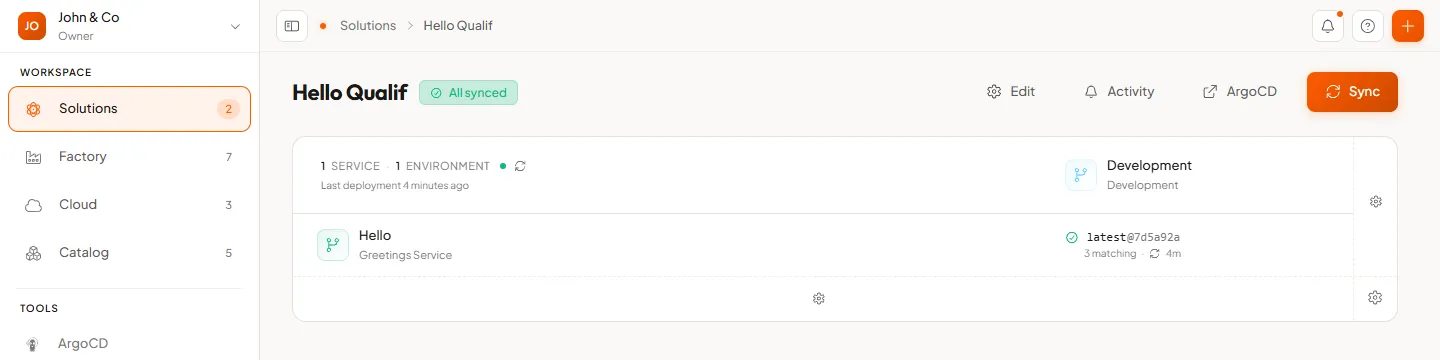
GitOps-driven deployments
Section titled “GitOps-driven deployments”Deployments are now GitOps-driven: the desired state lives in Git and the platform continuously reconciles your clusters to match it. The Sync button and the per-cell status you see in the Matrix come from this. It gives you a versioned history and easy rollbacks. See GitOps in Core concepts for the short version.
Where things moved
Section titled “Where things moved”| In the previous dashboard | Now |
|---|---|
| Organization menu / “manage” | The organization menu (Team, Subscription) |
| The tools row (Git, registry, CI…) | The Tools section of the sidebar |
| Environment tabs (Development, Production) | The Cloud pillar (your clusters) |
| Services tab | The Factory pillar |
| Applications tab | The Catalog pillar |
| Routes, Volumes, Backups (under an environment) | The Cloud pillar, within each cluster’s resources |
Terminology
Section titled “Terminology”| Before | Now |
|---|---|
| Domain | Organization |
| Applications | Catalog |
| Services, clusters, and deployments managed separately | Solutions (the application as a whole) |